How to Make Black Friday Ad Videos with AI: Step-by-Step Guide & Real Examples
Black Friday moves fast. Shoppers need to understand your product and offer almost instantly, and a well-made video can communicate both before they scroll away. AI makes it possible to turn product images, reference ads, and campaign ideas into promotional videos without a full production setup. This guide explains two practical workflows: a quick approach for simple product ads and a more detailed approach for campaigns that need greater control over scenes, models, timing, or audio. You’ll also find practical ad formats, real examples, and ready-to-use prompts, along with examples of how AI tools such as AIReel can support each approach.

Table of Content
Black Friday moves fast. Shoppers need to understand your product and offer almost instantly, and a well-made video can communicate both before they scroll away.
AI makes it possible to turn product images, reference ads, and campaign ideas into promotional videos without a full production setup.
This guide explains two practical workflows: a quick approach for simple product ads and a more detailed approach for campaigns that need greater control over scenes, models, timing, or audio.
You’ll also find practical ad formats, real examples, and ready-to-use prompts, along with examples of how AI tools such as AIReel can support each approach.
What Makes a Black Friday Ad Video Different?
An evergreen product video can build interest gradually. A Black Friday video needs to make the product relevant, and the action feel timely. In a short clip, it usually has to do three things:
- Stop the scroll. Use a clear movement, contrast, question, or visual surprise in the first one or two seconds.
- Make the offer easy to understand. Viewers should know the product, discount, and deadline even when the sound is off.
- Reduce hesitation. A close-up, use demonstration, creator-style explanation, or bundle comparison can answer “Why this product?”
Keep these principles in mind while creating the video.
- Make the promotion part of the story: Do not wait until the final second to reveal the discount. Show the product first, introduce the offer during the video, and close with the CTA and deadline. Keep one main offer per video, such as “30% off sitewide” or “Buy two, get one free.”
- Add seasonal energy without losing the brand: Black, gold, red, gift boxes, shopping bags, and countdown visuals can signal Black Friday. Use them as accents so the product and offer remain easy to see.
- Design for phone viewing: Use 9:16 when short-form social is your main placement. Keep the product and important information in the safe center area, away from platform controls. Give each shot one clear action, and make sure the first frame works as a thumbnail.
- Use real urgency: “Ends tonight” only works when the sale really ends tonight. Use the approved date, time zone, stock information, and exclusions. Do not ask AI to invent a price or create fake scarcity.
Common types of Black Friday ad videos
Choose the video type before writing the prompt. A clear purpose produces a more useful result than a video that simply looks impressive.
Product showcase
Use a rotation, camera push-in, macro detail, or controlled lighting to show the product’s material, packaging, or finish. This works well for beauty, accessories, electronics, food, and home products.
Sale announcement
Open with movement, then show the product and the exact promotion. Keep the on-screen message short, high-contrast, and understandable without sound.
Countdown or last-chance reminder
Use a calendar, closing-store image, fading light, or another simple visual metaphor to show that the offer is ending. Create separate versions for the teaser, sale launch, and final day.
UGC-style demonstration
Use a natural phone-camera perspective and one believable use case. The presenter should explain one verified benefit instead of trying to cover the whole product page. Do not invent customer reviews, and follow platform rules for labeling AI presenters or synthetic content.
Gift guide or bundle comparison
Group products by recipient, budget, or use case, such as “for commuters,” “for beginners,” or “starter set vs. complete set.” This format helps shoppers decide and can support a higher-value bundle.
Cart or browse reminder
A simple “Still deciding?” message can work for people who already viewed or added the product. Show the item, one benefit, the deadline, and a direct return-to-cart CTA.
Brand atmosphere video
Black Friday does not have to be only about price. For people who already know your brand, use a short seasonal story, retail environment, or product grouping to communicate the brand mood before introducing the campaign.
What to Prepare Before Creating Black Friday Ads Video
You do not need a complicated production plan. A few clear materials and accurate campaign details are enough to start.
Product materials |
Offer details |
Creative direction |
|
|
|
No worries if you only have product images and a general campaign idea; you can still begin. More complete product references usually help AI keep the product’s appearance consistent.
Two ways to make a Black Friday ad video with AI
Choose the workflow based on how much time and control you need. The quick route is ideal for testing a few campaign ideas. The more detailed route is better when you have a larger set of product references, a clear storyboard, or a specific model and sound direction in mind.
Below, I will show a step-by-step tutorial to guide you through making a complete Black Friday ad video, along with real examples I created by following my process.
Method 1: Use Marketing Studio for a quick, simple video
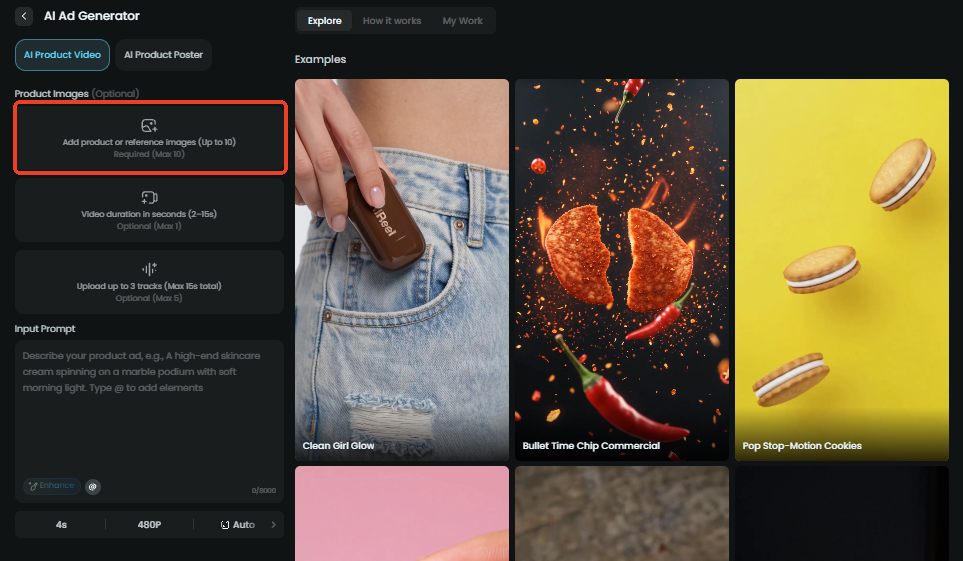
Step 1 - Upload Your Product Image
Go to an AI product video generator. Click "Create Your Product Video" and jump to a workspace.
Upload images of your product (up to 10), including the main image, side views, and close-ups. More complete references help preserve the product’s shape, colour, and packaging.
Step 2 - Input the Prompt, Set Other Parameters and Generate
Write a short prompt that covers the product action, setting, camera movement, mood, and exact offer. Name the details that must stay unchanged, such as the shape, colour, label, logo, or material. If the video includes an offer, provide the exact approved wording. For example: “Black Friday 30% Off.”
Choose the video duration, solution, and other settings as you want. If your advertising video is targeted at mobile users, it is advisable to choose a vertical screen ratio such as 3:4 or 9:16.
| Product Image | Prompt | Result Video |
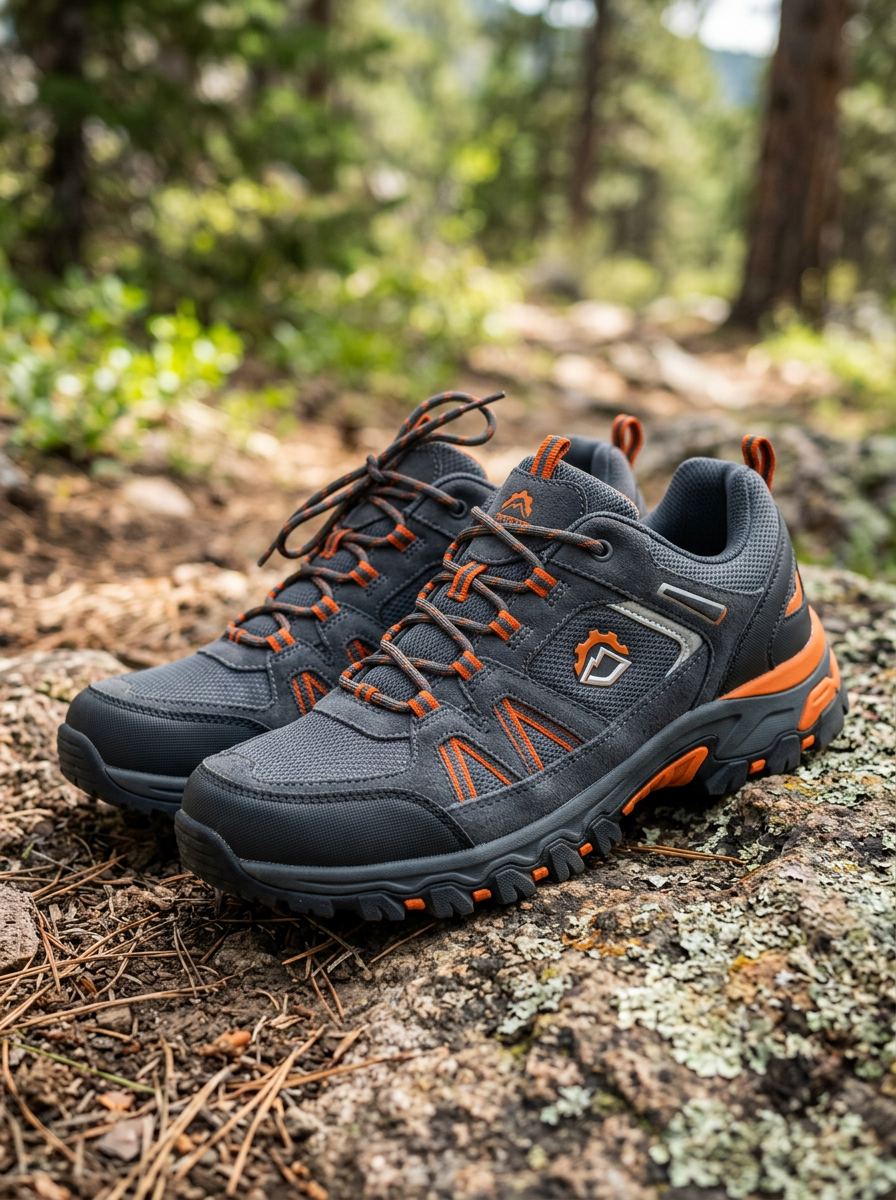 |
Keep the exact shoe shape, dark grey material, orange accents, and logo unchanged.Create a Black Friday outdoor commercial. Use a premium black, charcoal, orange, and metallic-gold colour palette with subtle seasonal styling. Keep the mountain setting realistic and avoid Christmas decorations. 0–2 seconds: Low-angle shot of the shoes stepping onto rocky mountain terrain, with dramatic natural light and warm-gold rim lighting. 2–7 seconds: Smooth tracking shot follows the shoes across rugged rocks, highlighting grip, texture, and durability. Add subtle cold-weather mist. 7–11 seconds: Hold on the shoes against a dark rocky background. Show: “Black Friday 30% Off” and “All-terrain grip for extreme trails”. 11–15 seconds: Close-up of the shoes, followed by a dark Black Friday end card with gold accents: “Shop Now – Ends Midnight” and the brand logo. Style: cinematic, premium, adventurous, realistic outdoor commercial. |
Tips: A simple structure for a 15-second ad
One clear structure is enough for most Black Friday clips:
- 0–2 seconds: movement, question, or visual contrast.
- 2–7 seconds: product showcase or one use case.
- 7–11 seconds: the offer and one credible product reason.
- 11–15 seconds: CTA, deadline, and brand close.
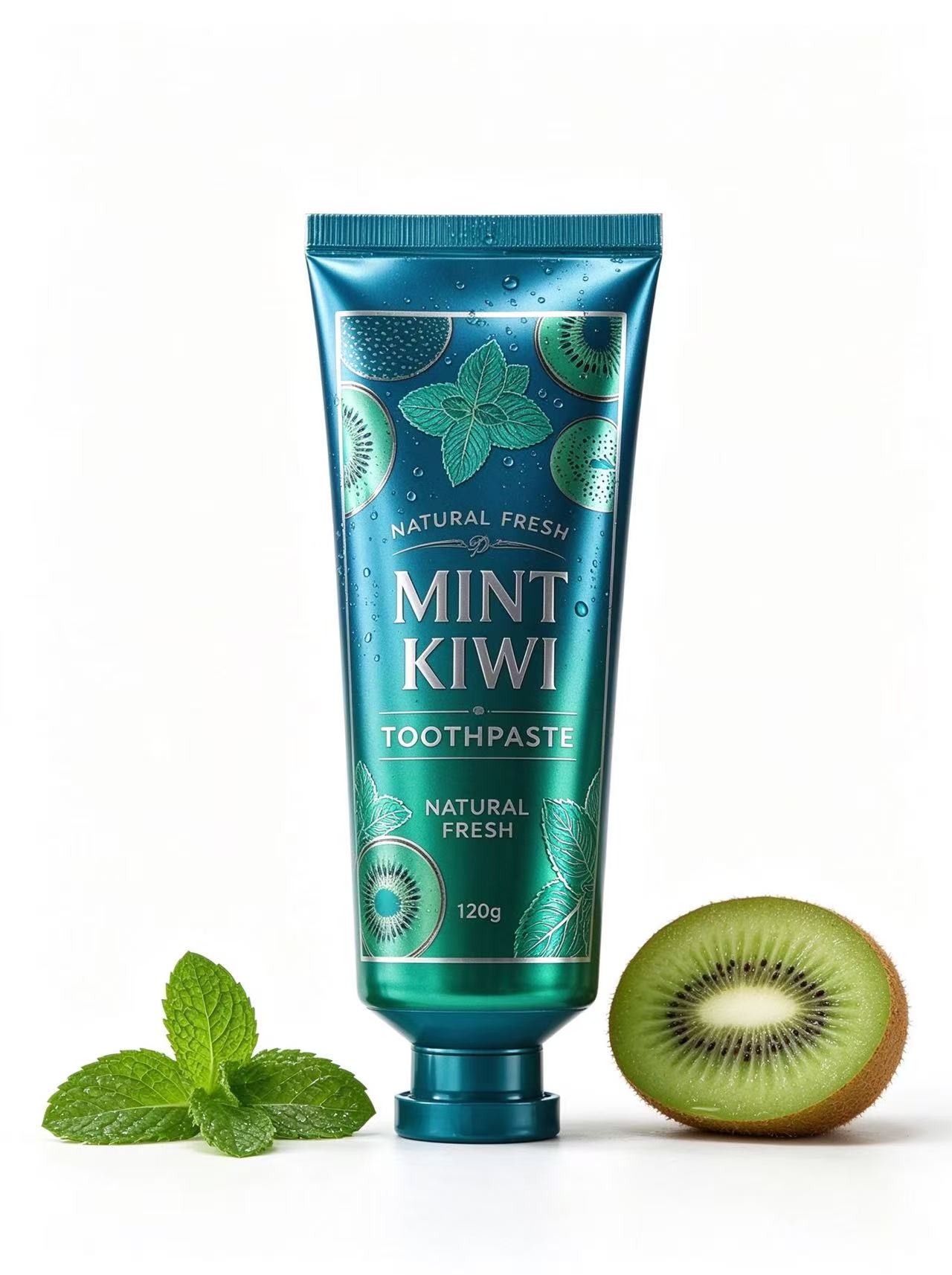
If you have a reference ad you want to clone, open an AI Video Ad Clone and upload the ad clip (up to 15s) and your product images to references (up to 10).
For a Black Friday ad video, don't forget to add some seasonal energy:
| Product Image | Reference Ad | Result Video |
 |
Step 3 - Review and Revise the Prompt
Watch the full result once it is generated. If the product shape, packaging, movement, or mood is wrong, revise the prompt and generate another complete version. You do not need to assemble separate clips on a timeline.
Check the following before you keep a version:
- The product shape, colour, logo, and packaging stay consistent.
- The price, discount, date, currency, and product name are correct.
- The first two seconds make the topic clear.
- The product, offer, and CTA still make sense with the sound muted.
- Hands, faces, reflections, and product interactions look natural.
- The first frame works as a clear thumbnail.
When a version is close, change one thing in the next prompt: the background, camera movement, lighting, or tone. Small controlled changes make it easier to learn which direction works.
Method 2: Use Refer to Video for more detailed control
If you have more time, detailed product materials, or a fully developed Black Friday concept, go to a refer to video tool.
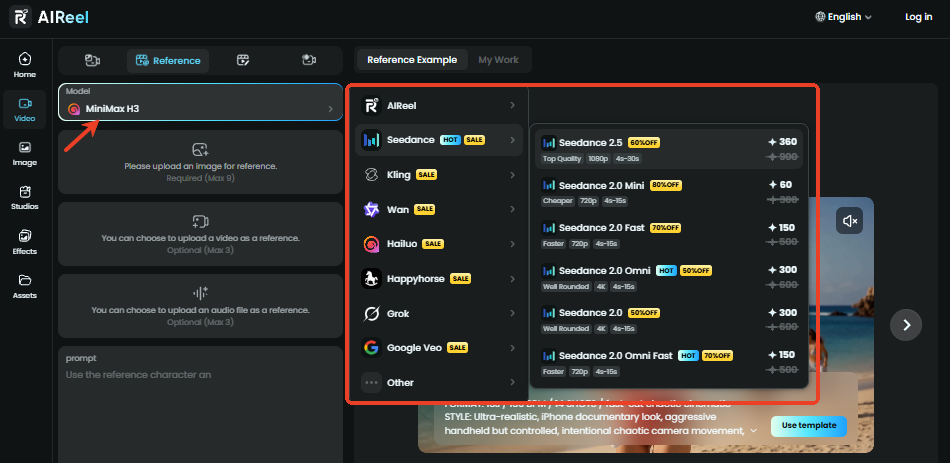
This workflow lets you combine multiple visual references with a more detailed script or scene direction, choose the video model you trust, and use audio when your concept depends on narration, dialogue, or sound design.
Step 1 - Upload Your Image and Other References
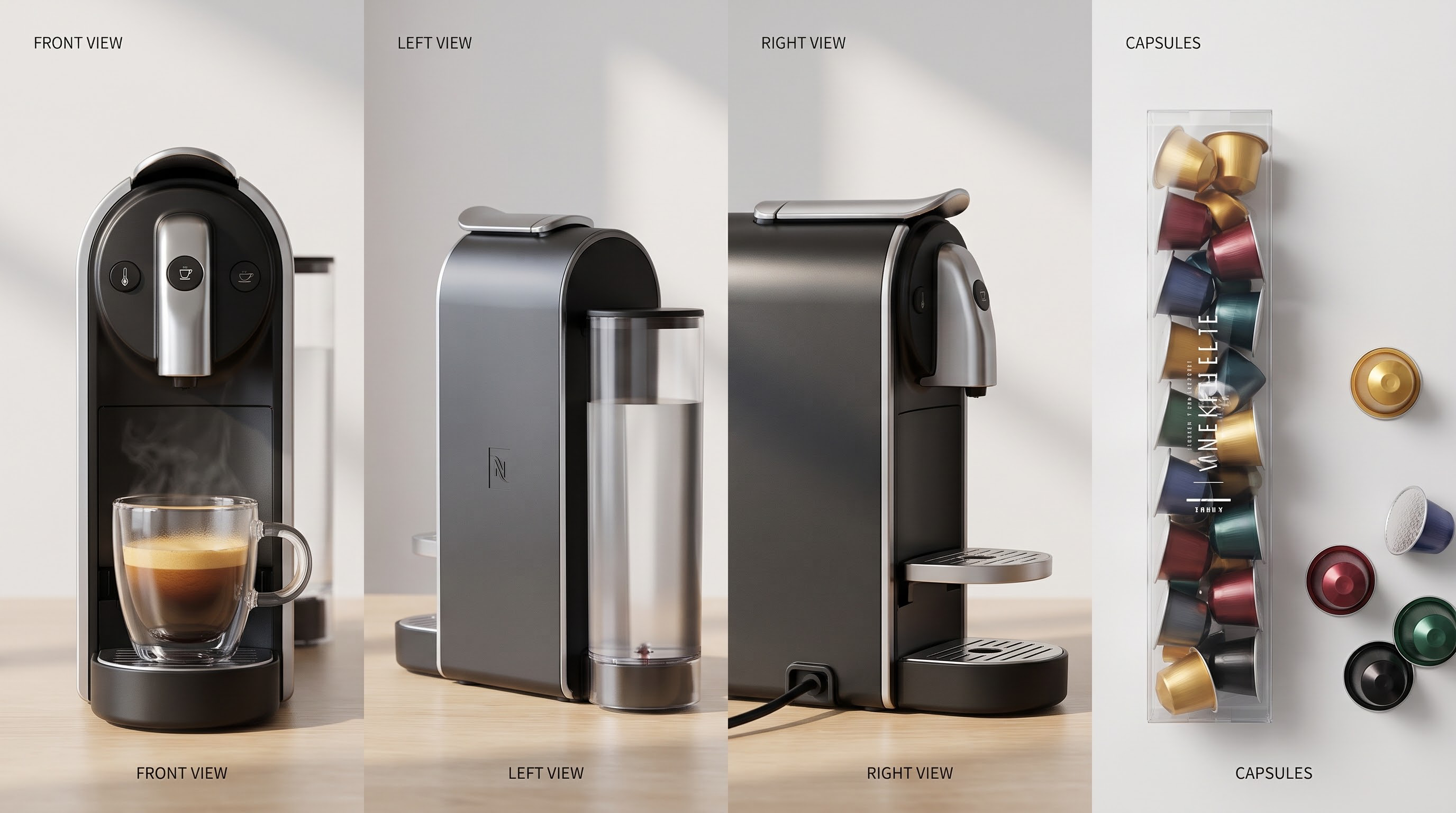
Upload the product, character, packaging, scene, or storyboard images that the video needs.
| Product Images | Product Presenter |
 |
 |
Step 2 - Describe the Video, Choose Model, and Generate
Describe the action in detail. You can write the scene progression, camera movement, timing, product handling, dialogue, captions, lighting, and ending frame in one prompt.
Choose a generation model based on the result you want. Models such as Kling 4.0 and Seedance 2.5 can support videos of up to 30 seconds, depending on the model and available settings.
| Prompt | Result Video |
|
Use @Image1 for the capsule coffee machine and capsules, and @Image2 for the person using it. Keep the machine and capsules’ exact shape, colour, logo, and design unchanged. Create a 15-second vertical 9:16 Black Friday lifestyle ad with a premium black, red, gold, and warm cream palette. Add subtle holiday details such as soft string lights, evergreen accents, and elegant gift wrapping. Keep the look tasteful and uncluttered. 0–2 seconds: Show bold text: “Black Friday 20% Off + 3 Free Capsule Packs” with an energetic push-in on the machine. 2–7 seconds: In a warm holiday kitchen, the person inserts a capsule, presses the button, and watches coffee flow into a cup. Emphasize speed and simplicity. 7–12 seconds: Transition to a cozy home scene with soft festive lights. The person enjoys the coffee by the window with a relaxed smile, creating a café-quality moment at home. 12–15 seconds: Show the machine and capsules with gold holiday accents. Display: “Buy the machine, get 3 free packs + 20% off. Shop Now.” End with the brand logo. Style: warm, cinematic, cozy, premium Black Friday commercial. |
Review the full sequence, and refine the script or references when needed. This route gives you more control, but it also benefits from a clearer storyboard and more complete source materials.
Copy-and-Paste Prompts for Black Friday Videos
These prompts are written in English because they generally produce stable production directions. Replace the bracketed fields and make sure the images uploaded to References show the same product described in the prompt.
1. Product showcase
Create a 15-second vertical 9:16 Black Friday product showcase using all uploaded product reference images of [PRODUCT]. Preserve the exact shape, materials, colours, logo placement, and packaging details. Place the product on a matte black stone pedestal with subtle warm-gold rim lighting. Start with a close macro detail, slowly move the camera around the product, then finish with a stable front-facing hero shot. Focus on one smooth product movement, premium commercial lighting, realistic reflections, and a clean Black Friday mood. Keep the label readable and do not invent features, prices, or lettering.
2. Sale announcement
Create a fast, energetic 12-second vertical 9:16 Black Friday sale announcement using all uploaded reference images of [PRODUCT]. Open with a quick visual hook, then reveal the product in a clean front-facing shot. Show this exact offer: “[OFFER]”. End with “[CTA]” and “[END DATE]”. Use high-contrast black and gold lighting, short readable captions, and a clear product hero frame. Keep the offer as the only promotion. Do not invent prices, claims, or extra discounts.
3. Reference ad adaptation
Create a new Black Friday ad of no more than 15 seconds using the uploaded reference video for its camera movement, pacing, and scene progression. Replace the original product with [PRODUCT] from all uploaded product reference images. Preserve the product’s exact shape, colours, logo, and packaging. Keep the same high-level visual rhythm but change the setting, brand expression, copy, and offer to fit [BRAND]. Show the exact promotion “[OFFER]” and finish with “[CTA]”. Do not copy the original brand, logo, wording, or product.
4. Countdown or last-chance reminder
Create a 10-second vertical 9:16 last-chance Black Friday ad for [PRODUCT] using the uploaded product reference images. Show the product on a clean retail counter while the visual mood moves from “Ending soon” to “[END DATE]” and “Shop now”. Use a simple closing-store visual metaphor, such as a softly lowering shutter or a shrinking light bar. Keep the packaging and logo unchanged, use urgent but trustworthy pacing, and finish with a clear product close-up. Do not imply scarcity beyond the supplied deadline.
5. UGC-style demonstration
Create a 15-second vertical 9:16 UGC-style Black Friday product demonstration for [PRODUCT]. Use a natural handheld smartphone look in a bright, believable [SETTING]. A friendly presenter holds the product with the label facing the camera, demonstrates one specific use case—[USE CASE]—and explains one verified benefit: “[VERIFIED BENEFIT]”. Keep the delivery conversational and the product details consistent. End with the exact offer “[OFFER]” and CTA “[CTA]”. Add clear captions. Avoid exaggerated claims, medical promises, or invented testimonials.
6. Gift guide or bundle comparison
Create a 15-second vertical 9:16 Black Friday gift-guide video using the uploaded reference images of [PRODUCT A] and [PRODUCT B]. Preserve both products accurately. First show “[RECIPIENT OR USE CASE A]” with Product A, then “[RECIPIENT OR USE CASE B]” with Product B, then show the approved bundle arrangement. Use warm seasonal styling, tasteful gift-wrap accents, and consistent brand colours. Show the exact bundle offer “[BUNDLE OFFER]” and finish with “[CTA]”. Keep both labels readable and do not add extra claims.
7. Cart reminder
Create an 8-second vertical 9:16 Black Friday retargeting video for [PRODUCT] using the uploaded reference images. Begin with a calm close-up and a subtle movement toward the camera. Communicate “Still deciding?” with a short on-screen caption, then show one verified benefit and the exact offer “[OFFER]”. Finish with “[END DATE]” and “[CTA]”. Keep the tone helpful rather than pushy, preserve all product details, and do not imply that personal data is being tracked.
8. AI presenter product introduction
Create a 15-second vertical 9:16 Black Friday product introduction with an AI presenter for [PRODUCT], using all uploaded product reference images. The presenter should look friendly and credible for [TARGET AUDIENCE], hold the product with the label visible, and deliver this exact short script: “[SCRIPT]”. Use a simple branded background, natural hand movement, and clear captions. End with the exact offer “[OFFER]” and CTA “[CTA]”. Do not create a fake customer review or add claims that are not in the script
Common Mistakes to Avoid
- Trying to fit every benefit into one clip. Keep one main promise in each 15-second video and make separate versions for other benefits.
- Letting AI invent the offer. Supply the approved price, discount, dates, and conditions yourself.
- Chasing a Black Friday look that hides the brand. Seasonal styling should support your normal product colours, typography, and tone.
- Copying a reference ad too closely. Borrow the high-level movement or pacing, then replace the product, logo, copy, setting, and brand expression.
- Forgetting silent viewing. The visuals and captions should still communicate the product, offer, and CTA without audio.
- Publishing the first generation without checking it. Review logos, packaging text, fingers, reflections, dates, and prices before downloading.
FAQs about Creating Black Friday Ad Videos
What is the best length for a Black Friday ad video?
Keep the video as short as the message allows. A product reveal or sale announcement often works in 8–15 seconds. A demonstration, presenter, or more detailed story may need longer output, as long as the extra time adds useful information rather than repetition.
What should a Black Friday ad video include?
Show the product, one clear benefit, the exact offer, and a direct CTA. Add the deadline when the promotion is time-limited. Make sure the first seconds create interest and the main message remains clear without sound.
Which Black Friday video format should I choose?
Use a product showcase for visual details, a sale announcement for a broad promotion, a countdown for the final stage, a UGC-style demonstration for an easy-to-understand use case, and a bundle or gift-guide video when shoppers need help choosing between products.
Do I need a reference video to make an AI Black Friday ad?
No. Product images are enough for a product showcase, sale announcement, or demonstration. Use a reference video when the camera movement, pacing, or visual structure is difficult to explain in words and you have permission to use that reference.
How can I keep the product and offer accurate?
Upload clear images from several angles and describe the shape, colours, packaging, logo, and materials that must stay unchanged. Supply the approved price, discount, dates, and conditions yourself. Review every generated result before publishing, especially small text and packaging details.
What should I test first?
Test the opening first because it determines whether viewers keep watching. Once you find a promising hook, test the offer wording, product action, background, and CTA one at a time.
Can I use AI-generated videos in paid ads?
Usually, but check the commercial-use terms of the tool and the advertising platform. Make sure you have permission for the product images, reference videos, music, logos, and likenesses used in the creative. Some platforms may also require disclosure for AI presenters or synthetic content.
Which AIReel tool should I use for a quick Black Friday video?
Use AIReel Marketing Studio. Choose AI Product Video for product images, AI Video Ad Cloner for a reference ad, or AI Product Avatar when the concept needs a presenter. Upload your References, write a focused prompt, generate, and revise the prompt if needed.
When should I use AIReel Refer to Video?
Use AIReel Refer to Video when you have detailed product or storyboard references and want more control over the script, scene progression, model, duration, or audio. Models such as Kling 4.0 and Seedance 2.5 can support videos of up to 30 seconds, depending on the selected settings.
Can I add audio in AIReel Refer to Video?
Yes. Refer to Video includes an audio upload option for concepts that depend on narration, dialogue, lip sync, music, or sound design. Describe how the audio should work with the product action and review the result for timing and synchronization.
A Marketing Studio Built for Diverse Needs in Ads Creation
AIReel Marketing Studio brings several product marketing workflows into one place. You do not need a timeline or professional editing software to follow this process.
Choose the workflow that matches your needs and the material you have:
- AI Product Video: Start with product images and generate a product ad from scratch.
- AI Video Ad Cloner: Start with a reference ad and create a new version for your product.
- AI Product Avatar: Use an AI presenter to introduce the product or explain an offer.
- AI Product Poster (for image creation): Create a matching promotional poster or e-commerce visual when needed.
Final Takeaway
A Black Friday ad does not need to explain everything. It needs to make the product, the offer, and the next action clear within a few seconds. AIReel gives you a quick Marketing Studio workflow for simple product ads, plus Refer to Video when you need more detailed control over references, models, duration, or audio.
Start with one product, one video type, and one goal. Upload your images to References, describe the details that must stay unchanged, and give the video one clear action. If you have a reference ad or a more developed concept, choose the workflow that fits it, review the result, and refine the prompt until the video is ready to use.