Wan 2.7 AI Video Generator Create More Controllable AI Videos
✅ Free online access ✅ No waitlist, fast generation ✅ Text to video & image to video & reference to video ✅ First & last frame control ✅ 1080p HD output ✅ Consistent characters across shots
Key Features of Wan 2.7 Video Generator
First & Last Frame Control
Guide exactly how your video begins and ends by uploading a starting frame and an ending frame. Wan 2.7 automatically generates smooth transitions between scenes, making it easier to create cinematic sequences, product showcases, story-driven content, and controlled camera movements with greater precision.
Multi-Reference Character Consistency
Maintain consistent characters, visual styles, and scene elements across multiple shots using reference images and videos. Wan 2.7 improves identity preservation, helping creators build longer stories, branded content, and recurring characters without noticeable visual drift.
1080p HD Video Output
Create sharper, more detailed AI videos with support for high-quality 1080p output. Improved motion rendering and visual fidelity help produce content suitable for social media, marketing campaigns, product demos, and professional creative projects.
Native Audio & Lip-Sync Generation
Generate videos with synchronized speech, sound effects, and audio-visual alignment in a single workflow. Built-in lip-sync support helps create more natural dialogue scenes and localized content without relying on separate audio production tools.
Step-by-Step Guide to Using Wan 2.7 on AIReel
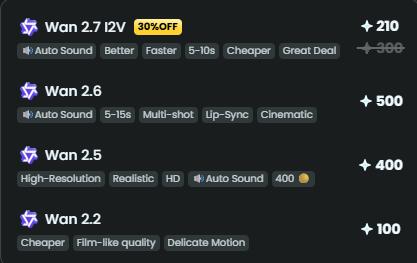
Select Wan 2.7 AI model based on your storytelling complexity and audio-visual needs.

Describe your story, scenes, or characters, or upload reference visuals to guide generation.

Generate, preview, and refine your cinematic AI video before downloading or sharing.
Pick Your Plan
Select a plan to get more credits