FLUX 3 AI Video Generator Video and Audio in One Take

Generate visuals, dialogue, sound effects, and ambience together—not in separate steps. Add 14+ language lip sync, 10-keyframe control, multi-shot storytelling, and 65% cheaper Draft previews.

Prompt
A fast-paced, high-energy trap hip-hop beat, paired with a powerful 808 bass. A male rapper delivers a vibrant performance, skillfully employing various authentic accents and seamlessly switching languages in sync with the video: English (0-2.5 seconds), Spanish (2.5-5 seconds), French (5-7.5 seconds), German (7.5-10 seconds), authentic Egyptian Arabic slang "كلامي نار، على البيت بنسوق الساحة" (10-12.5 seconds), Russian (12.5-15 seconds), Japanese (15-17.5 seconds), and English (17.5-20 seconds). The vocals are clear, the mixing is professional, and they blend naturally with the powerful accompaniment. A 20-second, fast-paced, multilingual hip-hop music video. The camera follows a cool male rapper wearing an oversized black streetwear hoodie and a silver chain. The scenes, backgrounds, and the language he speaks seamlessly switch every 2.5 seconds, with lip movements perfectly synchronized with the visuals: - 0 to 2.5 seconds: New York subway platform, English rap: “Yeah, we start in the streets, feel the bass in your chest.” - 2.5 to 5 seconds: Colorful alleyways of Madrid, Spanish rap: “Ritmo salvaje, cruzando la frontera sin control.” - 5 to 7.5 seconds: Paris rooftops overlooking the Eiffel Tower, French rap: “Le flow s'envole, on domine le monde.” - 7.5 to 10 seconds: Berlin industrial warehouses, German rap: “Spür den Beat, wir übernehmen die Nacht.” - 10 to 12.5 seconds: Cairo streets, with the pyramids in the distance, Arabic rap: “هٰهه ه” قققققققققققققققققققققققققققققققكفففففف”. - 12.5 to 15 seconds: Moscow snow square, rapping in Russian: “Этот ритм ломает стены, только вперед.” - 15 to 17.5 seconds: Tokyo neon street, rapping in Japanese: “光る街のノイズ、俺たちのビートは止まらない.” - 17.5 to 2020s: Chinatown cyberpunk street with red lanterns, rapping in English: “Break all the rules, this is our era!” The artist’s lip movements, head gestures, and hand gestures are precisely varied to match the pronunciation and rhythm of each language in each clip. Cyan and orange color tones, anamorphic lens flare, rich environmental reflections, and high-quality music video aesthetics. Fast-paced, high-energy trap hip-hop rhythm with a powerful 808 bass. As the rhythm begins, a male rapper delivers a vibrant performance in various regional accents, precisely switching languages according to the video feed: English (0-2.5 seconds), Spanish (2.5-5 seconds), French (5-7.5 seconds), German (7.5-10 seconds), Arabic (10-12.5 seconds), Russian (12.5-15 seconds), Japanese (15-17.5 seconds), and Chinese (17.5-20 seconds). The vocals are clear, the mixing is professional, and they blend naturally with the powerful accompaniment.

Why FLUX 3 AI Video Generator Stands Out

Native Audio, Generated with Every Scene

Create FLUX 3 videos with dialogue, sound effects, and ambience generated together with the visuals—no separate dubbing or audio-sync workflow needed.

14+ Language Lip Sync for Global Videos

Generate natural multilingual dialogue with synchronized lip movements in English, Chinese, Japanese, Spanish, French, German, and more—ideal for turning one idea into localized content.

10-Keyframe Control for Image-to-Video

Guide your FLUX 3 image-to-video generation with up to 10 timed keyframes, giving you precise control over product shots, character poses, transitions, and important story moments.

Multi-Shot Videos in a Single Generation

Create multiple scenes and camera angles in one FLUX 3 generation while keeping the story connected, so you can build richer sequences with less manual shot-by-shot stitching.

How to Use FLUX 3 Online for Video Creation
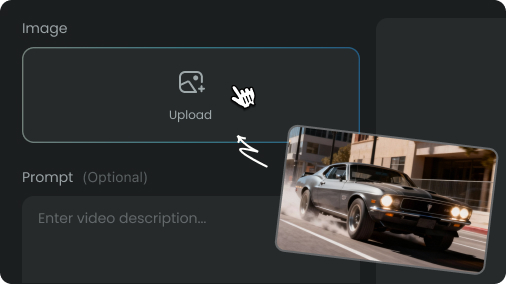
Add Your Prompt or Image to Flux 3
Step 1
Add Your Prompt or Image

Describe the scene you want, or upload an image to guide your FLUX 3 image-to-video generation. Add dialogue, sound, motion, and camera details for more precise results.
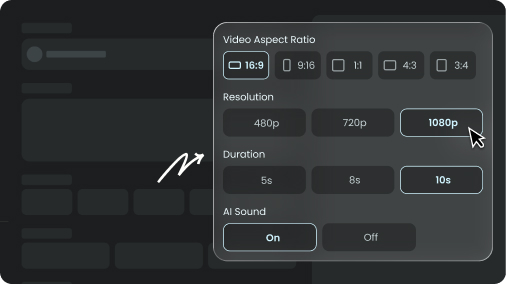
Customize Your Video for Flux 3 video
Step 2
Customize Your Video

Adjust the available video settings and use Draft mode to preview ideas faster before committing to your final generation.
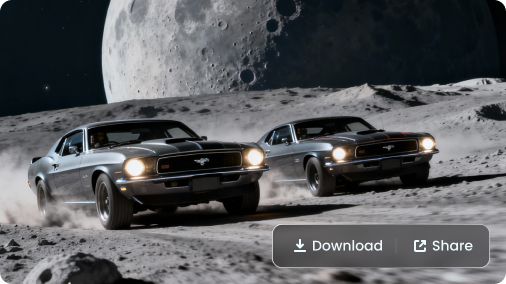
Generate and Download Your Flux 3 AI Video
Step 3
Generate and Download

Generate your FLUX 3 video with synchronized visuals and audio, then download the result for social media, ads, storytelling, or other creative projects.

Pick Your Plan

Select a plan to get more credits

FLUX 3 AI Video Generator FAQs

Generate More. Edit Less. Create with FLUX 3.