MiniMax H3: From Visuals to Audio, A More Complete AI Video Experience

Access MiniMax H3 through AIReel and explore advanced AI video generation without complex API setup. Create 2K videos with audio, references, and flexible text or image workflows in one platform.

Prompt
Use the two uploaded images as the only identity references for the two main characters. Reference @[图片 1] = the pet. Reference @[图片 2] = the human. The pet in every shot must be the exact same pet from Image 1. The human in every shot must be the exact same person from Image 2. Preserve the pet's species, face, fur color, markings, eyes, ears, nose, fur texture and body features. Preserve the human's face, hairstyle, body, age, clothing and identity. Do not use the pet or human identity from the reference video. Use the reference video only for its concept, framing, camera movement, actions, locations and pacing. Photorealistic cinematic live action, 16:9, 15 seconds, 24fps. The human runs toward the camera while the uploaded pet follows behind. The pet is gigantic, about 3-4 times its normal size, but keeps realistic anatomy and natural movement. The pet is not a monster and never attacks the human. Keep both characters consistent in every shot. Low camera, backward tracking, realistic perspective, natural motion blur, shallow depth of field, warm indoor light changing to golden outdoor sunlight. 00:00-00:01: Very low camera near a polished dark wooden floor, moving backward through a warm living room. The uploaded human runs in the lower center, leaning forward, arms swinging, tense expression. The gigantic uploaded pet follows from the deep background. Show a dining table, chairs, cream walls, white door frames and a dark fireplace or cabinet. 00:01-00:03: Continue the low backward tracking shot. The human keeps running and briefly looks back. The gigantic pet follows closely with large natural steps, gentle head movement and realistic fur motion. Its expression is focused and confused, never aggressive. Pass a dark rug, fireplace or sofa area. 00:03-00:04: The human enters a hallway. The floor changes from dark wood to pale beige tile. The pet comes through a white doorway behind the human, slightly turning and stepping over the threshold. Its head and shoulders nearly fill the doorway. 00:04-00:06: Enter a kitchen with light brown cabinets, a white refrigerator with colorful magnets or notes, and a wooden fruit stand. Orange fruits and a few green fruits are scattered across the tile floor. The human runs between them, slightly changing direction to avoid them. The gigantic pet follows behind, occupying most of the background. 00:06-00:07: A large orange fruit rolls from the background toward the camera on the tile floor, passing center-right. The human avoids it and continues running. The pet steps beside it, gently moving nearby small fruits. Realistic weight and rolling physics; no floating or exploding fruit. 00:07-00:08: The human runs through an open door first. The camera moves backward across the threshold from warm indoor light into sunlight. The pet follows from shadow into the light, creating a golden rim light around its fur. Show the threshold and floor transition naturally. 00:08-00:11: Low outdoor camera over dark soil, leaves, pink flowers and tall green grass. The human keeps running toward the camera, briefly loses balance on the soil, then recovers. The gigantic pet follows through the grass with its head above the grass. A curved yellow hose crosses the foreground and moves slightly, never covering the human's face. Golden backlight, glowing fur edges and floating dust. 00:11-00:13: The camera slows. The human slows and looks back at the pet. The pet comes clearly through the grass, showing its head, chest and front paws. Grass brushes its face and shoulders. It stops close to the camera and faces the lens, changing from calm to confused surprise. 00:13-00:15: Slowly push into a chest-up frontal close-up of the uploaded pet. Preserve the exact identity and appearance from Image 1. The pet starts with a closed mouth, then slowly opens it as if making a short sound or surprised breath. No roar and no exaggerated teeth. The uploaded human remains tiny in the grass behind it. End with the pet staring directly into the camera with wide eyes and an open mouth.

Why Creators Choose MiniMax H3 for AI Video Creation

Generate Videos with Built-in Stereo Audio

MiniMax H3 can generate videos with native stereo audio, helping creators create more immersive content without adding sound effects or dialogue separately after generation.

Create Detailed Videos with Native 2K Generation

MiniMax H3 supports native 2K video generation, helping creators produce sharper visuals with more detailed characters, environments, and product scenes. This makes it suitable for high-quality marketing videos, cinematic content, and visual storytelling.

Optimized for UI Design and Product Visualization

MiniMax H3 is optimized for generating UI-focused visuals, product demonstrations, and digital experiences. It can better understand interface elements, screen layouts, and product details, making it a strong choice for creating app showcases, website animations, and design concept videos.

Keep Characters Consistent with Reference Images

With reference-based generation, MiniMax H3 helps maintain character appearance and visual style when creating videos from images. This makes it easier to produce recurring characters, AI stories, and branded content.

How to Use MiniMax H3 AI Video Generator Online
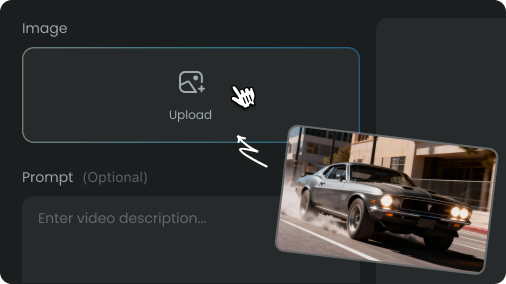
MiniMax H3 prompt and image input
Step 1
Enter Your Idea or Upload References

Start with your creative idea, text prompt, image, or reference materials. Describe the scene, characters, style, or visual direction you want MiniMax H3 to create.
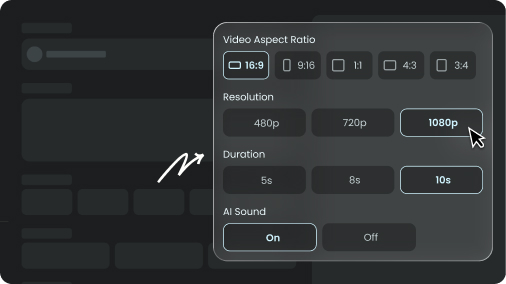
MiniMax H3 video settings adjustment
Step 2
Customize Your Video Generation

Refine your prompt and adjust your creative inputs to guide the video style, scene details, character appearance, and overall visual result.
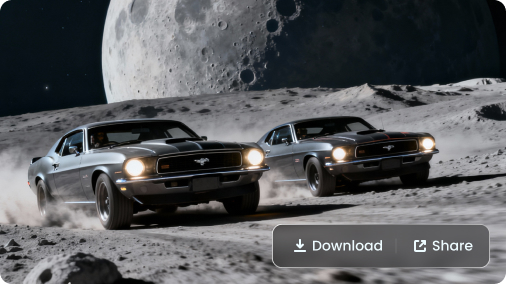
MiniMax H3 video generation result
Step 3
Generate and Explore Your AI Video

Let MiniMax H3 transform your ideas and references into a high-quality AI video. Preview the result, make adjustments if needed, and create the final version for your project.

Pick Your Plan

Select a plan to get more credits

FAQs About MiniMax H3 AI Video Generator

Unlock New Possibilities with MiniMax H3